YouTube automation means running a YouTube channel where you don't film yourself or do every job yourself. You pick the topics and run the channel. Writers, voice artists and editors, or AI tools, make the videos. Most of these channels are faceless: a narrator, visuals and captions, with no host on camera.
It is a real way to build a channel, but it is not passive income. YouTube does not pay for videos that feel mass-produced, and in 2025 it tightened that rule. This guide covers how YouTube automation works, what it costs, and how to make it with AI without breaking YouTube's rules.
What YouTube automation means (and what it doesn't)
The phrase is used in two ways.
| Meaning | What it is | Who uses the term |
|---|---|---|
| Outsourced or AI-made channel | You run the channel. A team or AI makes the scripts, voiceover and edits | Creators, "cash cow" channel courses |
| Software automation | Tools that schedule uploads, write descriptions or post clips automatically | Marketers, workflow tools like Make or Zapier |
This guide is about the first meaning: a channel you run like a small studio, where most of the production is handed off.
"Automation" is a misleading word. Someone still has to choose topics, check facts, approve scripts and watch every video before it goes out. The channels that work treat it as running a small media business, not pressing a button.
How a YouTube automation channel works
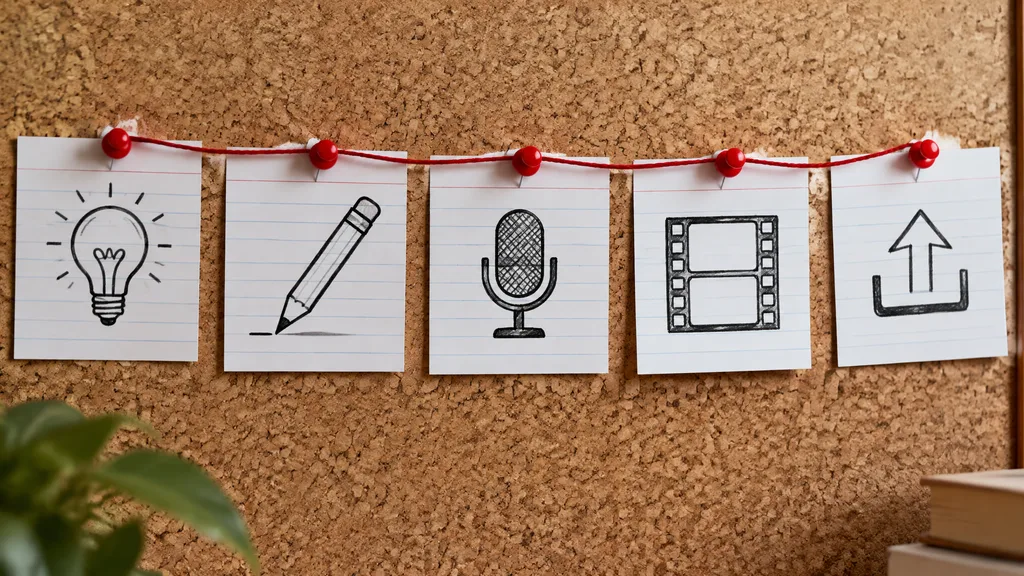 The five jobs in every automation channel. Made with FrameSurfer's Text to Image model.
Every video goes through the same five jobs. The only question is who does each one.
| Job | Done by hand | Handed to a freelancer | Done with AI |
|---|---|---|---|
| 1. Topic | You research what people search and watch | Rarely outsourced | AI can suggest angles; you choose |
| 2. Script | You write it | Scriptwriter | AI drafts, you edit and fact-check |
| 3. Voiceover | Your own voice | Voice artist | AI voice |
| 4. Visuals and edit | You edit stock footage | Video editor | AI video and image models, auto captions |
| 5. Title, thumbnail, upload | You | Thumbnail designer | AI helps with title ideas; you decide |
Classic automation channels paid a freelancer for each job. AI has made jobs 2 to 4 much cheaper, which is why so many new faceless channels appeared in 2025 and 2026. It is also why YouTube now looks harder at channels that all look the same.
YouTube's rules for automation channels in 2026
YouTube does not ban faceless or AI channels. It refuses to pay for videos that are mass-produced, copied or empty. These are the rules that decide whether an automation channel earns money.
Joining the Partner Program
To earn from ads, a channel needs one of these in the YouTube Partner Program:
- 1,000 subscribers and 4,000 public watch hours on long videos in the last 12 months, or
- 1,000 subscribers and 10 million public Shorts views in the last 90 days.
A lower tier opens memberships, Super Thanks and Shopping earlier in many countries: 500 subscribers, plus 3,000 watch hours in the last year or 3 million Shorts views in the last 90 days.
The bar goes up on February 1, 2027. From that date, new applicants for ad revenue need 1,000 subscribers plus either 8,000 watch hours in 365 days or 20 million Shorts views in 90 days. Channels already in the program keep their place but must accept the new terms by January 31, 2027. The lower fan-funding tier does not change. If your channel is close to the current numbers, apply before February 2027.
Reaching the numbers only lets you apply. A person at YouTube reviews the whole channel.
The "inauthentic content" rule
On July 15, 2025, YouTube renamed its "repetitious content" rule to "inauthentic content". The monetization policies say channels with mass-produced or repetitive videos can't earn money. YouTube's examples include:
- Videos that feel interchangeable, with little difference from one to the next
- The same story template reused with the same outcome every time
- Slideshows or scrolling text with little or no story, commentary or teaching
- AI videos made from generic templates that add none of the creator's own ideas
The same page says using AI to show a story or character you made up is fine, and that templates and automated tools are fine when the final video shows creative vision. The test is whether each video shows your own idea.
YouTube is enforcing this harder. In his January 2026 letter, CEO Neal Mohan named "AI slop" and said YouTube will use its spam and clickbait systems to show less low-quality AI content. In December 2025 YouTube shut down two channels that posted fake AI movie trailers, with more than 2 million subscribers between them.
Reused content
Reading out Reddit posts, news articles or other people's scripts, or compiling clips from other channels, counts as reused content. Permission from the original creator does not change this. Automation channels built on reuploads are the first to lose monetization.
Labeling realistic AI
YouTube asks you to switch on its AI disclosure in YouTube Studio when a video shows realistic things that didn't happen, like a real person saying something they never said, or a realistic fake event. Cartoon, fantasy and obviously animated videos don't need it, and neither does AI help with scripts or captions. YouTube says labeling does not hurt reach or earnings.
Automation channels that work vs. ones that get demonetized
| Likely to earn | Likely to be refused or demonetized |
|---|---|
| A clear niche with a point of view (history mysteries, space facts, money lessons) | Random trending topics with no theme |
| Each script researched and written for that video | One script template with a few words swapped |
| A recurring narrator voice and visual style | Different random voices and styles each time |
| Original AI scenes that match the story | Stock clips or AI clips stitched together with no story |
| A series where every episode has its own story | Reuploads, compilations, read-out Reddit threads |
| Realistic AI fakes labeled in YouTube Studio | AI "doctor" or "financial advisor" personas |
How to start a YouTube automation channel with AI
Step 1: Pick a niche you can make 50 videos about
Write down 50 video titles before you make one video. If you can't, the niche is too narrow. Good automation niches have a lot of stories and a curious audience: history, true crime, science, space, psychology facts, mythology and bedtime stories. Our faceless YouTube channel guide lists niches and why they work.
Step 2: Decide Shorts first or long videos first
| Shorts first | Long videos first | |
|---|---|---|
| Length | 15 seconds to 3 minutes | 8 to 20 minutes |
| Path to monetization | 10 million Shorts views in 90 days | 4,000 watch hours in 12 months |
| Production per video | Low | High |
| Earnings per view | Low | Higher |
Many automation channels start with Shorts to find which topics land, then turn the winners into long videos.
Step 3: Build a repeatable workflow
Write one style guide before you start: the narrator voice, the caption style, the visual look, the video length and the structure (hook, story, payoff). Every video follows it. This is what makes a channel feel like a channel, and it is what separates a series from mass-produced content.
Step 4: Make the videos
In FrameSurfer you describe the video in a sentence, or paste your own script. The Agent writes a narrated script split into scenes, and you edit that plan before anything is made. Then it generates each scene with the AI video model you pick, records the voiceover, adds synced captions and music, and cuts it together. You can change timing and text in the editor and export an MP4 in 9:16 for Shorts or 16:9 for long videos.
Two features matter for automation:
- Saved characters. A recurring narrator or mascot looks the same in every video. Plans include 5 to 30 saved characters. See how to keep characters consistent.
- Your own script. Paste a script you wrote and FrameSurfer keeps your words. That keeps the ideas yours.
FrameSurfer is built for short videos. For a long-video channel, use it for the Shorts that send viewers to your long uploads.
Step 5: Publish on a schedule and check the numbers
Post on the same days each week. After 20 to 30 videos, look at YouTube Analytics: which topics got the most views, and where viewers dropped off. Make more of what worked and fix the opening of videos that lost people in the first 3 seconds. Our guides on getting more views on YouTube Shorts and hook sentences help with that.
What YouTube automation costs
| Setup | What you pay for | What you do |
|---|---|---|
| Freelancers for every job | A writer, a voice artist and an editor for each video | Manage the team, pick topics, review |
| AI for script, voice and visuals | AI credits per video | Write or edit scripts, review every video |
| Mix: AI drafts, human edit | Credits plus an editor or writer | Most common setup in 2026 |
Freelancer prices vary a lot by country, length and quality, so get quotes before you plan a budget. AI costs depend on the video model and the length of the video. On FrameSurfer, plans start at $19 a month; see plans.
Is YouTube automation worth it in 2026?
It can be, if you treat it like a small studio and not a money machine.
It works when you pick a niche you care about, give every video its own idea, keep a consistent voice and style, and post for months before judging it.
It fails when you copy a "cash cow" niche from a course, make videos from one template, reupload other people's work, or expect income in the first few weeks. Most channels earn nothing for the first months, and many never reach the Partner Program.
Frequently Asked Questions
What is YouTube automation?
YouTube automation is running a YouTube channel where you don't make every video yourself. You choose topics and manage the channel, while freelancers or AI tools write the scripts, record the voiceover and edit the videos. Most automation channels are faceless.
Is YouTube automation allowed?
Yes. YouTube allows faceless channels, outsourced production and AI tools. It does not pay for mass-produced, repetitive or reused content. Since July 2025 this rule is called "inauthentic content". Each video needs its own idea and real value.
Can you monetize an AI YouTube automation channel?
Yes, if the videos are original. YouTube's policy says using AI to bring your own story or character to life is fine. Channels of templated, interchangeable AI videos, read-out articles or AI expert personas giving health, legal or financial advice are not monetized.
How much does it cost to start YouTube automation?
It depends on who makes the videos. Freelancers are paid per script, voiceover and edit, so each video costs real money. AI tools for script, voice and visuals cost credits per video, which is usually far less. Your time for topics, review and publishing is a cost either way.
How long until a YouTube automation channel makes money?
Usually months. You first need 1,000 subscribers plus either 4,000 watch hours in 12 months or 10 million Shorts views in 90 days, then a manual review. From February 1, 2027, new applicants need 8,000 watch hours or 20 million Shorts views instead. Many channels never get there, so plan for at least 50 videos before judging a niche.
What is a cash cow channel?
"Cash cow" is a nickname for a faceless automation channel built to earn ad money, often in high-paying niches like finance or tech. The name comes from automation courses. YouTube treats these channels like any other: they need original content to be monetized.